# improvise
*Terminal pivot-table modeling in the spirit of Lotus Improv — multidimensional cells, formulas over dimensions instead of cell addresses, and vim-style keybindings for reassigning axes on the fly.*
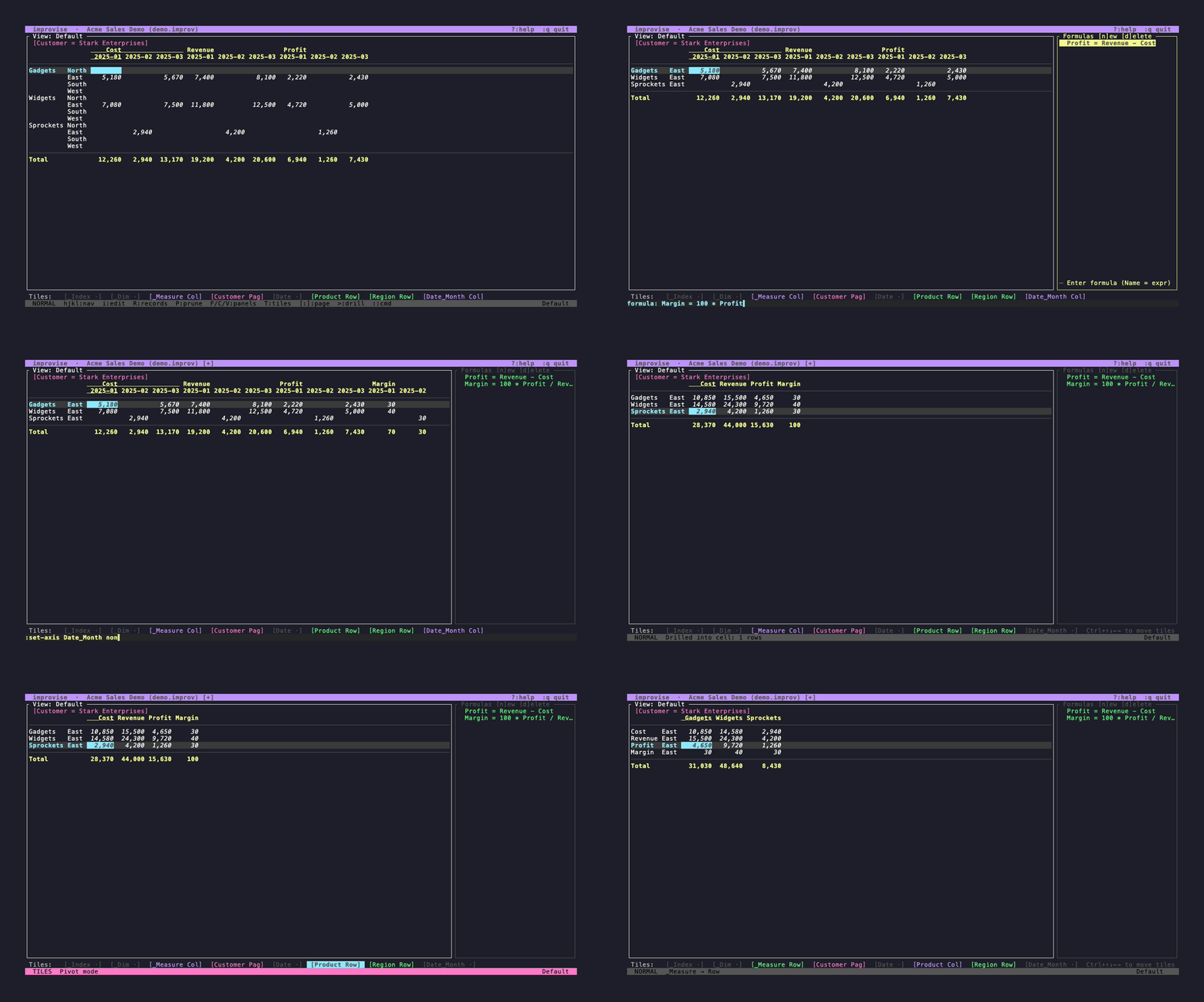
## Why this exists
Lotus Improv (NeXT, 1991) separated data from its presentation: cells were
addressed by named dimensions, not grid coordinates, and rearranging a view
didn't break formulas. That idea never made it into mainstream tools. Excel
pivot tables borrowed the visual rearrangement but kept cell-address formulas.
Terminal data tools like sc-im and VisiData do different things well — sc-im is
a traditional spreadsheet, VisiData is a data explorer — but neither offers the
dimension-keyed data model that made Improv interesting. improvise is a small
attempt to bring that model to a modern terminal, with a formula language that
references category and item names, views that can be rearranged with a single
keystroke, and a plain-text file format you can diff in git.
See [docs/design-notes.md](docs/design-notes.md) for the original product
vision and non-goals.
## Quick start
```sh
nix build .
./result/bin/improvise examples/demo.improv
```
Or import your own CSV:
```sh
./result/bin/improvise import path/to/data.csv
```
The included `examples/demo.improv` was generated from `examples/demo.csv`:
```sh
improvise import examples/demo.csv \
--no-wizard \
--category Region --category Product --category Customer \
--measure Revenue --measure Cost \
--time Date --extract Date:Month \
--axis Region:row --axis Product:row \
--axis Date_Month:column --axis Measure:column \
--axis Customer:page --axis Date:none \
--formula "Profit = Revenue - Cost" \
--name "Acme Sales Demo" \
-o examples/demo.improv
```
## Key bindings to try first
| Key | Action |
|-----|--------|
| `T` | Enter tile mode — reassign category axes |
| `[` / `]` | Cycle through page-axis items |
| `>` | Drill into an aggregated cell |
| `<` | Return from drill-down |
| `F` | Open the formula panel |
| `t` | Transpose rows and columns |
| `?` / `F1` | Full key reference |
| `:w` | Save |
| `:q` | Quit |
## Installation
### With Nix (preferred)
```sh
nix build .
# or install into your profile:
nix profile install .
```
### From crates.io
Not yet published — `improvise` is not on crates.io, so `cargo install
improvise` does not work today. It is tracked as improvise-l36.
### Prebuilt binaries
The [GitHub releases page](https://github.com/fiddlerwoaroof/improvise/releases)
carries prebuilt binaries for Linux (x86_64 and aarch64) and macOS (Intel and
Apple Silicon), built by `cargo dist`. The current release is the `v0.1.0-rc2`
prerelease; there is no `v0.1.0` tag yet (improvise-3tj).
## The data model
Every cell lives at the intersection of named categories and items —
`(Region=East, Measure=Revenue)` — not at a grid address like `B3`. A model
can have up to 12 categories, each with an ordered list of items that can be
organized into collapsible groups (e.g. months grouped into quarters).
Formulas reference dimension names, not cell addresses:
```
Profit = Revenue - Cost
Tax = Revenue * 0.08
Margin = IF(Revenue > 0, Profit / Revenue, 0)
BigDeal = Sum(Revenue WHERE Region = "West")
```
The formula language supports `+` `-` `*` `/` `^`, comparisons, `IF`, and
aggregation functions (`Sum`, `Avg`, `Min`, `Max`, `Count`) with optional
`WHERE` clauses. Formulas apply uniformly across all intersections — no
copying, no dragging, no `$A$1` anchoring.
## Views and axes
A view assigns each category to one of four axes: **row**, **column**,
**page** (slicer), or **hidden**. The grid layout is a pure function of
`(Model, View)` → `GridLayout` — transposing is just swapping row and column
assignments, and it happens in one keystroke (`t`). Page-axis categories act
as filters: `[` and `]` cycle through items.
Press `T` to enter tile mode, where each category appears as a tile in the
tile bar. Move between tiles with `h`/`l`, then press `Space` to cycle axes
or `r`/`c`/`p` to set one directly.
Records mode (`R`) flips to a long-format view by assigning the virtual
`_Index` and `_Dim` categories to row and column axes. Drill-down (`>`) on an
aggregated cell captures a snapshot; edits accumulate in a staging area and
commit atomically on exit.
## File format
Models persist to a plain-text `.improv` format that reads like markdown and
diffs cleanly in git:
```
# Sales 2025
## Category: Region
- North
- South
- East [Coastal]
- West [Coastal]
> Coastal
## Category: Measure
- Revenue
- Cost
- Profit
## Formulas
- Profit = Revenue - Cost [Measure]
## Data
Region=East, Measure=Revenue = 1200
Region=East, Measure=Cost = 800
## View: Default (active)
Region: row
Measure: column
format: ,.2f
```
Gzip-compressed `.improv.gz` is also supported. Legacy JSON is auto-detected
for backward compatibility.
## Import and scripting
The import wizard analyzes CSV columns and proposes each as a category
(string-valued), measure (numeric), time dimension (date-like, with optional
year/month/quarter extraction), or skip. Multiple CSVs merge automatically
with a synthetic "File" category.
All model mutations go through a typed command registry, so the same
operations that back the TUI work headless:
```sh
# single commands
improvise cmd 'add-cat Region' 'add-item Region East' -f model.improv
# script file (one command per line, # comments)
improvise script setup.txt -f model.improv
```
## In the browser
The browser page is at ****,
built and published from `main` by the `build` / `pages-deploy` jobs in
`.github/workflows/ci.yml`. A deploy only happens after **every** check job in
that workflow has passed. The list is deliberately not repeated here — naming a
subset is how this sentence went stale before, and `scripts/check-ci-graph.py`
now holds `pages-deploy`'s `needs` to the workflow's own job keys.
The site **root** is the landing page — `docs/index.html`, with the recorded
terminal casts — and it links to the app. `web/assemble.sh` puts the two
together, which is why the app sits under `app/` rather than at the root: every
path in `app.js` and `worker.js` is relative, so the bundles move with it and
the generated wasm-pack glue needs no editing.
**It needs no server.** The page is still a thin client — it holds no model,
and every question about a cell, its text and whether it may be typed into, is
answered by a server and arrives already decided — but the server it talks to
is an in-page Web Worker hosting the whole `App` over the browser's private
storage (OPFS). It is seeded on first load from `web/demo.improv`, so a visitor
lands on a document, and edits persist across a reload without leaving the
machine. `?doc=` and `?seed=` name another document and the file it is first
seeded from.
To run the same page locally:
```sh
./web/build.sh # wasm-pack -> web/{pkg,worker-pkg}
python3 -m http.server 8080 --directory web
```
The page and the OPFS backend are exercised by a Playwright harness in
`harness/` — `npm ci` and `./harness/build.sh`, then `npx playwright test` from
that directory. `tests/shell.spec.js` runs `web/app.js` under Chromium against a
mocked peer; `tests/opfs.spec.js` runs the `Storage` contract against a real
`OpfsFs` in a real Web Worker under Chromium and Firefox (WebKit provides no
OPFS and is skipped on a runtime probe). CI's `browser` job runs both and can
fail the build.
To open a document hosted by a separate process instead — which is how a
document open in the TUI is shared — start the websocket server and pass
`?ws=`:
```sh
cargo run -p improvise-ws-server -- examples/demo.improv --port 8787
```
then reload with `?ws=127.0.0.1:8787`.
**The scheme is not yours to supply and defaults to TLS.** `?ws=` takes a
`host:port`; the page uses `wss://` when it is itself served over https and
`ws://` when it is served over http, because an https origin refuses a `ws://`
address as mixed content. An explicit `ws://` from an https page is upgraded
rather than passed through — passing it through can only produce a failure
that reads like "the server is not running".
So the local pairing above works as written, and it is the case worth
optimising for: `http://localhost` is not a secure-context problem, so nothing
below is needed to develop, to demo locally, or to share a TUI-hosted document
with another tab on the same machine.
The server checks `Origin` on the handshake, which is what makes that safe. A
WebSocket is exempt from the same-origin policy — there is no CORS preflight —
so without the check any page you visited could connect to `ws://127.0.0.1:8787`
and read or edit the document while the server runs. **Pages served from
loopback are allowed by default**, which is exactly the recipe above; every
other page is refused unless you name it with `--allow-origin`. A client that
sends no `Origin` at all — curl, a script, a native client — is allowed, because
no browser omits it and refusing them would answer a question `--bind` already
answers.
This is not authentication (see the next section) and it does not depend on the
browser: whatever Chromium's **Local Network Access** work ends up covering, the
handshake is refused here rather than at the browser's discretion.
### Sharing a TUI-hosted document with a remote browser
Reaching `improvise-ws-server` from the **deployed** https page means
terminating TLS in front of it. `improvise-ws-server` speaks plain `ws://`
only — there is no rustls, no native-tls, nothing in the crate or its
dependencies — so `wss://` is not obtainable from the binary itself, and this
is the supported way to get it.
**Say the cost first, because it is real.** This means the documented path to
sharing involves a second piece of software, which is a poor answer for a tool
whose selling point is that it is one binary. It is the answer anyway, for a
reason given under "Why not native `wss://`" below. If you only want *a*
document in *a* browser, you do not need any of this — that is the standalone
worker deployment, it is what the Pages site is for, and it needs no server
process at all.
**Read this before following any of it.** `improvise-ws-server` has **no
authentication of any kind**, and that is a deliberate MVP limit rather than an
oversight — its own module doc says so. Anyone who can open a socket to it can
**rewrite every document it serves**. Loopback binding is the only thing
currently standing between that and the network, and *terminating TLS in front
of it removes exactly that protection*: the proxy is public, so the endpoint is
public, and `--bind 127.0.0.1` protects the port while doing nothing about the
proxy. TLS gets you confidentiality, not access control.
**And the control has to be one a browser can actually satisfy**, which rules
out most of the obvious ones. The page opens the socket as
`new WebSocket(url)` — one argument, a URL — and the distinction that decides
everything here is **ambient credentials versus challenge–response**:
- The handshake **is** an HTTP request, so the browser attaches what it
attaches *automatically* — cookies for that host above all. That is why an
identity-aware proxy can work at all.
- What the page cannot do is **set a header** (there is no `Authorization`
argument to `new WebSocket`) or **answer a prompt** (a handshake surfaces no
login dialog, and its failure reaches script as a bare connection error).
So **HTTP basic auth is not a locked door here, it is a 401 the page can
neither answer nor explain** — the same shape as the self-signed certificate
that rules out native `wss://` below. Anything challenge-shaped fails for that
reason; anything ambient may work. Client-certificate mTLS sits awkwardly
between the two — the certificate is offered at the TLS layer rather than by
the page, but the selection UI browsers show is a top-level-navigation
affordance, and whether a cross-origin socket handshake gets it is **not
something verified here**.
**And "who may connect" is two questions, not one.** A WebSocket is **exempt
from the same-origin policy** — there is no CORS preflight on a handshake — so
any hostile page an allowed user visits can open a socket to your endpoint
*from that user's own allowed address*, and read and write the document. An
address check cannot see that, because by then the request genuinely does come
from an allowed client. Only the **`Origin` header** distinguishes them, and
`improvise-ws-server` checks it: pages served from loopback are allowed, and
anything else must be named with `--allow-origin`. **Deploying behind a proxy
therefore needs the flag** — the deployed page's origin is
`https://fiddlerwoaroof.github.io`, which is not loopback. Keep the Origin
allow-list in the proxy as well: it is defence in depth now rather than the only
defence, and it is what covers a proxy configuration that strips or rewrites the
header before the server can see it.
So the honest controls are the ones that need **no credential from the page**:
- **An IP allow-list in the proxy** — the cheapest, and the worked example
below. It is about where the client is, so the page sends nothing. On its
own it answers only the first of the two questions above.
- **A private network** (Tailscale, WireGuard). The peer is only reachable by
machines already on it; again the page sends nothing.
- **An identity-aware tunnel** (`cloudflared` with Cloudflare Access) — the
*ambient* case above, and the reason that distinction is drawn at all. It
works by a session **cookie** set after an interactive login on the proxy's
own hostname, which the handshake then carries by itself; so it needs the
user to visit that hostname first, and it is
subject to the browser's third-party-cookie rules. Plausible and *not
verified here* — the Playwright harness mocks its peer and reaches no
identity-aware proxy — so it is named, not written out as a recipe.
What would make this genuinely easy is a **token in the URL**, because the URL
is the one place the page can put a credential *deliberately* — everything else
it sends is ambient. The server has
no such capability today, and whether it should grow one — or whether "auth is
the proxy's job" becomes a stated design position — is **improvise-kpnr**.
Until then: share only documents you would be willing to let anyone on the
other side of that control edit, and take the tunnel down when you are done.
A worked example with [Caddy](https://caddyserver.com/), which obtains and
renews the certificate itself. Point a DNS name at the host, then:
```caddyfile
# Caddyfile
improvise.example.com {
# NOT optional — see above. Without it the document is world-writable.
# An allow-list rather than a password, because the page cannot answer a
# challenge on a socket handshake: this is checked against the address.
@denied not remote_ip 203.0.113.4 198.51.100.0/24
abort @denied
# Defence in depth, and NOT redundant with the address check. A WebSocket
# is exempt from the same-origin policy, so any hostile page an allowed
# user visits can open this socket FROM THAT ALLOWED ADDRESS. The address
# check cannot see that; only the Origin can. The server checks it too —
# this is what covers a proxy that strips or rewrites the header.
@badorigin not header Origin https://fiddlerwoaroof.github.io
abort @badorigin
reverse_proxy 127.0.0.1:8787
}
```
```sh
# --allow-origin is required here: the deployed page is not a loopback origin,
# so without it the server refuses the handshake the proxy forwards.
improvise-ws-server bank-info.improv --port 8787 \
--allow-origin https://fiddlerwoaroof.github.io # still plain ws, still loopback
caddy run # terminates TLS, proxies to it
```
On the same terms as the browser caveat below: **this configuration has not
been executed in this repository** — there is no Caddy here, and the browser
harness that does exist never puts a proxy in front of the socket. It
is the form Caddy documents for `remote_ip`, and the reasoning about what a
browser can satisfy is checked against `web/app.js`, which opens
`new WebSocket(url)` and can therefore send no header. Verify the deny actually
denies before trusting it with a document.
Then, from , reload with
`?ws=improvise.example.com`. Caddy preserves the request path, so the
multi-document form works too: serve several files and name one with
`?ws=improvise.example.com/bank-info`.
Caddy needs no websocket-specific configuration — `reverse_proxy` passes the
`Upgrade` handshake through. nginx does: it needs `proxy_http_version 1.1` and
the `Upgrade`/`Connection` headers set explicitly, or the handshake is
answered as an ordinary request and the socket never opens.
For a one-off share with no DNS name and no certificate of your own,
`cloudflared tunnel --url http://127.0.0.1:8787` or `ngrok http 8787` each
print an https hostname that works the same way — pass the hostname to `?ws=`
without a scheme, and pass the page's own origin to `--allow-origin`, since it
is not loopback. Both print a **public** URL and neither authenticates anything
by default, and an unguessable URL is not a control.
Two things carry over from above. `ngrok http --basic-auth` does **not** help
here — the page cannot answer a basic-auth challenge on a socket handshake —
and what you want instead is the same **address check** the Caddy example
uses. But no command line for it is given here on purpose: ngrok has moved IP
restriction from the (now deprecated) `--cidr-allow` flag to a Traffic Policy
`restrict-ips` action passed with `--traffic-policy-file`, and cloudflared's
equivalent is a product feature of its own. Those spellings have already
changed once, none of them has been run in this repository, and a recipe that
is correct today and silently wrong at the next major version is worse than a
pointer — so: **consult their current documentation, and confirm the
restriction denies before you trust it with a document.** If you cannot put an
address check in front of the tunnel, do not expose it.
Note the server binds `127.0.0.1` by default and `--bind` is the only way to
widen that. Behind a proxy on the same host you should *not* widen it: the
proxy reaches loopback, and leaving the default keeps the **unencrypted** port
off the network. That is worth doing and is not access control — the proxy is
still the open door, which is why the **access controls** above belong there.
Those are access controls and not authentication, which the server still has
none of: they answer *which clients and which origins may connect*, never
*who* is connecting. The distinction is the whole of improvise-kpnr.
### Why not native `wss://`
Declined deliberately rather than merely unimplemented (improvise-o8fa). Adding
rustls is the easy half; the certificate is the hard one, and it is what makes
the feature worse than the proxy rather than better. A self-signed certificate
makes the browser refuse the socket outright — a websocket handshake has no
interstitial to click through, so the failure arrives as a bare connection
error with no usable indication that a certificate was the reason. That leaves
a real certificate or an explicitly trusted local CA (`mkcert`) as the only
pleasant options, and both of those are a second piece of software too. So the
choice is not "one binary versus two", it is "two either way, and one of the
options additionally ships a TLS stack and a certificate-loading surface in a
binary whose job is a pivot table". If sharing a TUI-hosted document to a
remote browser ever becomes a common case rather than an occasional one, this
is worth revisiting on that evidence.
Caveat, narrowed twice: `harness/` runs `web/app.js` under Chromium — the
standalone deployment under Firefox too — and `OpfsFs` under Chromium and
Firefox, in CI. The grouped and multi-level DOM is executed since
improvise-plcx, against a fixture document the harness serves beside the demo.
What is still never executed is the CSS and the `ResizeObserver` arithmetic —
and Safari, whose Playwright build provides no OPFS at all. `bindings.rs` **is**
run: the no-`?ws` test loads the app, which spawns the worker, which calls
`start()` and `OpfsFs::open()`.
## What's interesting about the architecture
All user actions flow through a two-phase command/effect pipeline. Commands
are pure functions: they receive an immutable `CmdContext` (model, layout,
cursor position, mode) and return a list of effects. Effects are the only
things that mutate app state, and each one is a small, debuggable struct.
This means commands are testable without a terminal, effects can be logged or
replayed, and the 40+ commands and 50+ effect types are all polymorphic —
dispatched through trait objects and a registry, not a central match block.
The keybinding system gives each of the 17 modes (`ModeKey`) its own keymap, with
Emacs-style prefix keys for multi-stroke sequences.
## Expectations
improvise is a personal project I built for my own use. I'm sharing it because
other people might find it useful, but I can't promise active maintenance or
feature development. Issues and PRs are welcome but may not get a fast
response. If you want to build on it, fork away.
## License
Apache-2.0